H.264 Explained: The Codec That Changed How the World Streams Video

Updated: Jul 7
H.264, also known as Advanced Video Coding (AVC), is a video compression standard that encodes high-quality digital video at significantly lower file sizes and bitrates compared to older formats. It works by analyzing video frames for redundant data and transmitting only the differences between frames, not the entire image every time. H.264 is the most widely deployed video codec on the planet, powering streaming platforms, IP surveillance cameras, video conferencing, and embedded vision systems worldwide.

Every time you stream a movie, join a video call, or replay a security camera feed, there is a very good chance H.264 is doing the heavy lifting. But what exactly is this codec, how does it work, and why has it remained the gold standard for video compression for over two decades?
What Is Video Encoding?
Raw video is essentially a long sequence of still frames played back fast enough that your brain reads it as motion. Shoot 1080p at 30 fps, and you're generating thirty separate full-res images every second. Do the math, and even a short clip becomes enormous, hundreds of megabytes per second of footage. Nobody's building a storage system or a network to move that volume of data unmodified.
So you compress it. Feed the raw footage into an encoder, and what comes out is a much smaller file, one that looks nearly identical to the original under normal viewing conditions. The encoder-decoder pair that makes this happen is called a codec coder/decoder, hence the name. Compress on one end, reconstruct on the other. That's the whole job.
Why Embedded Vision Systems Depend on Encoding
Most people's mental image of video encoding is Netflix or YouTube. But the engineers who build industrial cameras, medical imaging rigs, and smart city sensors have been dealing with this problem far longer than streaming was a thing. When your camera is mounted on a factory line with a 10-meter cable run to a controller board, bandwidth is tight, and storage budgets are fixed. Encoding is how you make the math work.
Storage overhead in industrial vision drops significantly once encoding is applied properly.
Security and surveillance streams stay usable on constrained network infrastructure.
Medical imaging pipelines can achieve real-time transmission without buffering delays.
Encoded video plays back on embedded devices that couldn't handle raw streams at all.
Smart city analytics systems process far more camera feeds when the bitrate is kept low.
What Are Codecs? And Where Does H.264 Fit In?
Codec is one of those terms that sounds more technical than it really is. Strip it back, and you've got a tool, software, hardware, or some combination that knows how to shrink video down to a manageable size and then rebuild it when someone needs to watch it. Pick the wrong codec for your system, and you're either overloading your hardware, boxing yourself out of compatible devices, or burning storage you didn't budget for.
Several codecs have earned serious real-world adoption. Here's the lay of the land:
Codec | Also Known As / Key Strength |
H.264 / AVC | Most widely deployed codec globally best compatibility |
H.265 / HEVC | ~50% better compression than H.264, ideal for 4K/8K |
AV1 | Open-source, royalty-free, growing in streaming platforms |
VP9 | Google's codec is used heavily on YouTube |
H.266 / VVC | Latest generation extreme compression for future use |
Among all of these, H.264 and H.265 remain the most used codecs in embedded vision cameras and USB camera systems, primarily due to proven reliability, universal hardware support, and real-time processing capabilities.
What Is H.264 / AVC?
H.264 has three names: Advanced Video Coding, AVC, and MPEG-4 Part 10, all pointing at the same standard. It came out of a joint effort between ITU-T and ISO/IEC, got officially ratified in 2003, and then spread fast. Blu-ray used it. Cable TV used it. When YouTube needed something that could run on every browser and every device without a plugin, H.264 was the answer. The same story played out across Zoom, surveillance systems, and embedded camera modules the world over.
Why did it stick? Mostly because it solved a hard problem well. Older standards were either too heavy for the bandwidth available or too lossy to produce acceptable image quality. H.264 landed somewhere neither predecessor had managed: video that looked good and didn't require massive infrastructure to deliver. That combination, more than anything, explains why it's still the default choice on so much hardware two decades on.
Common Container Formats for H.264 Video
.MP4 - Most widely used; compatible with virtually every device and platform
.MOV - Apple QuickTime; common in professional video production
.MKV - Open-source container; popular for high-quality archiving
.TS - MPEG Transport Stream; used in broadcast TV and surveillance systems
. F4V / .3GP - Flash and mobile video formats
H.264 is most often paired with AAC (Advanced Audio Coding) for audio, making it a complete, efficient package for video delivery across any platform or device.
How Does the H.264 Codec Work? (Step-by-Step)
Nobody really explains what's happening inside H.264. They just say "it compresses video" and move on. That's fine until you're the one configuring a camera system and trying to figure out why your bitrate is through the roof or why quality tanks at certain settings. The actual process isn't that complicated once you walk through it.
1. Frame Classification: I, P, and B Frames
Here's a question worth asking: if a security camera is pointed at an empty hallway and nothing moves for ten seconds, why would you encode all 300 frames as if each one is completely new? You wouldn't. H.264 doesn't either.

The codec looks at what's actually changing between frames and assigns each one a role accordingly. Three types exist:
I-Frames (Intra-coded) are complete, self-contained frames. Think of them like standalone JPEGs. They are the largest frame type, but don't rely on any other frame to decode.
P-Frames (Predicted) only store what changed since the previous frame. Much smaller than I-frames as a result.
B-Frames (Bi-directional) reference both the frame before and the frame after. The most space-efficient of the three.
A typical H.264 stream might have one I-frame for every fifteen to twenty P and B frames. That ratio alone accounts for a huge chunk of the overall compression gain.
2. Motion Estimation and Compensation
When an object moves across the frame, a car passing, a person walking, a robotic arm swinging, H.264 doesn't redraw it from scratch. Instead, it asks: where did this block of pixels go compared to the last frame? The answer gets stored as a motion vector, a tiny descriptor recording the direction and distance of that movement.
That vector might be just a few bytes. The alternative of retransmitting full pixel data for everything that moved could be thousands of times larger. For fast-moving content in robotics lines, traffic systems, or automation setups, this single stage does more compression work than almost anything else in the pipeline.
3. Block-Based Processing with Macroblocks
Rather than treating each frame as one big image to compress wholesale, H.264 chops every frame into a grid of 16x16 pixel blocks called macroblocks. Each block gets its own analysis pass.
The encoder is hunting for two things. First is spatial redundancy, which means patches of similar color or texture within the same frame that don't need to be stored twice. Second is temporal redundancy, meaning blocks whose content barely changed from the previous frame and can simply be described by a motion vector instead of fresh pixel data.
This granular approach matters a lot in medical imaging. A CT scan or endoscope feed typically has regions of sharp detail sitting right next to areas of near-uniform color. Block-level processing lets the encoder protect details where it counts aggressively everywhere else. A frame-wide approach simply can't do that precisely.
4. DCT Transform and Quantization
It's the difference between what the encoder predicted and what the frame actually contained. Small numbers, but they still need further compression. The Discrete Cosine Transform (DCT) is then employed. This transform translates the residual pixel values into frequency-domain coefficients, thereby representing the data based on the rate of value change within a block, as opposed to retaining each pixel value. High-frequency coefficients are indicative of intricate details, whereas low-frequency coefficients correspond to expansive color regions. The encoder rounds those coefficients down to lower-precision values, discarding the finer ones based on a quality threshold. The Quantization Parameter (QP) is the main dial here. Lower QP means better detail is preserved, but the file grows larger. Higher QP shrinks the file but introduces blocking artefacts around fine textures and sharp edges.
5. Entropy Coding
At this point, the data is already far smaller than what came in. But there is one final pass. Entropy coding targets statistical patterns in quantized coefficient data and compresses them further without discarding anything. Two options are available:
CABAC (Context-Adaptive Binary Arithmetic Coding) offers roughly 10 to 15 percent better compression but demands more processing power.
CAVLC (Context-Adaptive Variable-Length Coding) is simpler and faster, commonly used in the lower-power embedded platforms.
CABAC is the right call when your hardware can comfortably handle the computer overhead. CAVLC is the practical fallback when the encoder needs to stay lean.
The Decoding Process
The decoding process, in essence, mirrors the encoding procedure, but in reverse:
The compressed H.264 bitstream is received.
Quantized transform coefficients and motion vectors are extracted.
After, inverse quantization and inverse DCT are applied.
Frames are reconstructed using motion compensation data.
Finally, the decoded video sequence is output
Key Advantages of H.264
Here's what keeps H.264 relevant in production environments where newer codecs have theoretically surpassed it:
Advantage | Why It Matters |
Lower Bandwidth | Delivers HD video with far lower bandwidth than MPEG-2. Ideal for IP streaming and real-time remote monitoring. |
Reduced Bitrate | Up to 80% lower than Motion JPEG and 50% lower than MPEG-2 at equal or better quality. |
Smaller Storage | H.264 files are up to 50% smaller than MPEG-2, and store more footage with less hardware. |
High Image Quality | Even at low bitrates, H.264 preserves fine detail effective for megapixel camera systems. |
Universal Hardware | Supported by virtually every modern processor, SoC, GPU, and embedded platform. |
Real-Time Performance | Optimised encoding path ideal for live security feeds and industrial machine vision. |
Efficient for Low-Motion | Exceptionally space-efficient for stationary scenes such as surveillance and microscopy. |
Stack all of those together, and the picture becomes clear. Competing codecs beat H.264 on specific benchmarks, but none of them match its breadth of native hardware support or its track record in unpredictable real-world conditions.
H.264 vs. H.265: Which Should You Choose?
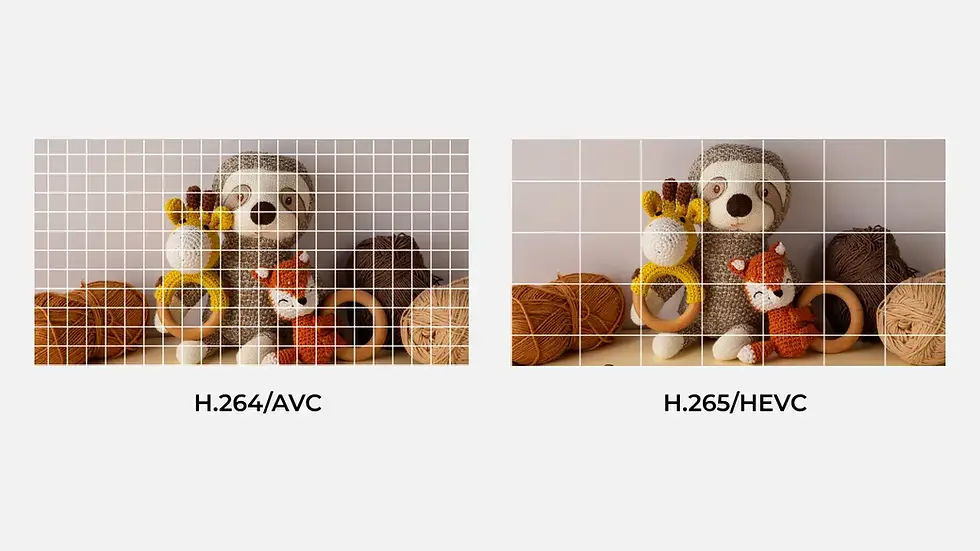
H.265 wins on compression numbers, full stop. But a benchmark advantage doesn't translate into the right deployment choice for every project. When hardware compatibility is mixed, when your encoder needs to run in real time on a constrained processor, or when you need something that will work out of the box across a dozen different device types, H.264 is still the practical answer. H.265 starts making sense once you're pushing 4K or higher resolutions, and storage is a real constraint, not just a theoretical one.
Camera Solutions from Vadzo Imaging
At Vadzo Imaging, our camera modules are built for real-world deployment. Our H.264-compatible cameras deliver high-resolution video with efficient compression across every interface: USB, MIPI CSI-2, and GigE.
What cameras support H.264 compression?
Cameras from Vadzo Imaging support efficient video streaming using the H.264 codec. These camera modules are designed for embedded vision systems, industrial automation, surveillance, and AI applications, and are available across USB, MIPI CSI-2, and GigE interfaces.
Product | Best For | Interface | Key Feature |
Robotics, AGV, drone, surveillance | UVC USB 2.0 Micro B | 1080p Global Shutter, On-Board Storage | |
Ultra-low-light GigE networking | GigE Vision (PoE) | 1080p HDR, Low-Light | |
4K wide field networked imaging | GigE Vision (PoE) | 4K HDR, Low-Light, NIR | |
Smart city, surveillance, drones | Dual Band Wi-Fi + PoE | 1080p HDR, Ultra Low-Light |
Frequently Asked Questions (FAQs)
What is H.264 video encoding?
H.264 video encoding compresses raw video into a smaller file without losing image quality. It stores only the differences between frames instead of saving every frame as a full image.
How does the H.264 codec work?
The H.264 codec splits video into I-frames, P-frames, and B-frames and removes unnecessary data at each stage. It then applies motion compensation, DCT transform, and entropy coding to produce a compressed, high quality video stream.
What is the difference between H.264 and H.265?
H.265 compresses video at 50% smaller file sizes than H.264 but requires more processing power. H.264 remains the preferred choice for embedded cameras due to its universal hardware support and reliability.
Why is H.264 still widely used today?
H.264 delivers clear video at low bitrates and works on virtually every device and platform without special hardware. Its stability and universal compatibility make it the most trusted codec for real-world deployments.
What are the advantages of H.264 in embedded camera systems?
H.264 reduces streaming bandwidth by up to 80% and cuts storage requirements significantly compared to older formats. It is natively supported on nearly every modern chip, making integration into embedded camera systems fast and straightforward.
Why H.264 Still Matters in Embedded Vision Systems
Twenty years is a long time for any technology to stay relevant. H.264 has not done it not because the industry is slow to change, but because it genuinely solves the encoding problem well enough that switching carries real cost for most teams. The licensing is settled. Hardware support is everywhere. And when something works reliably across environments as different as a Zoom call and a factory floor inspection camera, you don't replace it without a concrete reason.
For engineers building camera systems, the payoff from understanding H.264's internals isn't academic; it shows up in configuration decisions, hardware selection, and system architecture. Knowing why the codec makes the tradeoffs it does makes you better at tuning it for your specific conditions. The rest is just an implementation.


