OCR Camera Selection: Resolution, Focus, and Shutter

A team specifies a 13MP module for a passport reader, ships it, and the mid-line of the MRZ fails to parse about one time in twenty. The resolution was never the problem. The lens gave them a field of view three times wider than the document, so each character landed on nine pixels instead of the twenty-five the engine needed.

That is the failure mode that wastes the most time in OCR projects, and it is arithmetic, not optics. This post shows how to size an OCR camera from pixels per character rather than megapixels, then how to choose focus, shutter, dynamic range and interface once the number is fixed.
If you are choosing an embedded camera for OCR right now, start with the maths in the next section. Everything else follows from it.
What an OCR Camera Has to Deliver That a Webcam Does Not
An OCR camera is specified around one job: putting enough clean pixels on each character for a recognition engine to classify it.
That is a narrower requirement than general imaging, and it is why a consumer webcam fails on documents even at high megapixel counts. Webcams optimize for faces at a meter, with aggressive noise reduction and sharpening that smears exactly the fine strokes OCR depends on.
A camera for text recognition has to hold four things at once. Enough resolution across the text area. Sharp focus at your actual working distance. Enough dynamic range to survive glare. And a shutter that does not distort characters if anything is moving.
Get any one wrong, and the engine’s accuracy collapses regardless of the other three. A camera for text recognition is a system-level specification, not a sensor pick.
Software choice matters too, and you will likely run Tesseract, PaddleOCR, or EasyOCR behind the camera. But no engine recovers detail the camera never captured, which is why the camera decision comes first.
How Much Resolution Does OCR Actually Need?
Answer first: OCR engines need roughly 20 to 30 pixels of character height to classify reliably, and that number is what sets your resolution, not the size of the document.
Treat 25 pixels of x-height as a working target and validate it against your own engine and fonts. Below about 20 pixels, accuracy on small or unusual fonts starts to drop away quickly. Above about 40, you are paying for pixels the engine does not use.
So the resolution required for OCR is a function of three things you already know: the height of your smallest character, the height of your field of view, and the pixel count of your sensor. Note what is missing from that list. The physical size of the document never enters the resolution required for OCR calculation on its own.
Pixels Per Character OCR: The Calculation
Work it in one line. Sensor vertical pixels, divided by field of view height, multiplied by character height, gives you pixels per character.
Take an A4 page captured full-frame. The field of view height is 297 mm. A 6-point font has roughly a 1 mm x-height. A 13MP sensor gives you 3000 vertical pixels, so 3000 ÷ 297 × 1 equals about 10 pixels per character. Not enough.
Now take an ID card. Field of view height is 54 mm. The same 1 mm character on the same 13MP sensor gives 3000 ÷ 54 × 1, or about 55 pixels per character. Comfortably over target.
Same camera, same font, wildly different outcome. That is the whole lesson of pixels per character OCR: your lens and working distance matter as much as your sensor, and a high-resolution camera for OCR only helps if the field of view is tight enough to spend those pixels on text.
DPI for OCR and How Many Megapixels for OCR
Document scanning convention expresses the same idea as DPI for OCR, and 300 DPI is the long-standing baseline for reliable text recognition.
Convert between them easily. Sensor pixels divided by field of view in inches gives your effective DPI. An A4 page is 11.7 inches tall, so 3000 vertical pixels over that page is about 256 DPI, which is under the 300 DPI baseline and matches the pixels-per-character result above.
That is why how many megapixels for OCR has no single answer. A full A4 page at 300 DPI needs roughly 8.7 megapixels of well-used sensor area. An ID card at the same DPI needs well under one. A single date code on a carton needs less still.
So the honest answer to how many megapixels for OCR is: calculate the DPI for OCR your field of view demands, then choose the smallest sensor that meets it. Oversizing costs you frame rate, bandwidth, and host compute for no accuracy gain.
Where you cannot tighten the field of view, resolution is your only lever, and that is when a genuinely high-resolution camera for OCR earns its cost. Full-page archival capture and multi-document trays are the clear cases.
Capture Conditions: Focus, Dynamic Range and Illumination
Resolution sets the ceiling on accuracy. Capture conditions decide whether you reach it.
Autofocus Camera for OCR vs Fixed Focus
Choose by whether your working distance varies. That is the only question that matters here.
A fixed-focus module is the better engineering choice for a fixed station. There is no focus search, no hunting, no per-frame variability, and one less thing to fail over thousands of cycles. A kiosk with a document tray, an archive stand, a conveyor at a set height, all fixed focus.
An autofocus camera for OCR is what you need when the operator or the object controls the distance. Handheld capture, documents held up to a kiosk, or mixed media of different thicknesses all require it.
Vadzo splits its range along exactly this line. The Falcon-1335CRA, Falcon-821CRH, Falcon-521CRH, Falcon-234CGA and Falcon-830CRH carry VCM autofocus, while the Falcon-1335CRS, Falcon-821CRS and the Merlin modules are fixed focus for stations where distance is controlled.
The Falcon-1335CRA adds ROI-based autofocus, which matters more than it sounds. A full-frame autofocus loop can lock onto the tray edge instead of the document; ROI-based focus lets you tell it where the text is.
HDR Camera for OCR: Glare Is the Real Enemy
Glare is what breaks document capture in the field, and it is a dynamic range problem rather than a resolution one.
A laminated ID or a glossy label under overhead lighting produces a specular highlight that clips to pure white. Every character under that highlight is gone, and no amount of resolution recovers a clipped channel.
An HDR camera for OCR handles the mixed exposure instead of choosing between blown highlights and black shadows. The Falcon-821CRH offers 140dB HDR, and the Bolt-830MRS and Bolt-830CRS offer HDR up to 100dB, which is the specification to check when your lighting is uncontrolled.
The Innova-900MGS combines Quad HDR at 120dB with a global shutter, which is the pairing to look at when the scene has both mixed lighting and motion.
NIR Camera for OCR and Passport MRZ
Some text is not designed to be read in visible light at all.
The machine-readable zone on a passport is specified for near-infrared reading, which is why a general-purpose colour camera struggles with it. An MRZ passport reading camera needs NIR response and NIR illumination to see what the standard intends.
NIR also stabilises capture generally. An NIR camera for OCR lit by its own 850nm or 940nm illumination sees a consistent scene regardless of ambient room light, which removes a whole class of field variability.
Vadzo’s Bolt-830MRS and Bolt-830CRS carry NIR sensitivity at 850 and 940nm, and the Innova-900MGS provides dual NIR. Those are the modules to shortlist for an ID card scanning camera or any MRZ passport reading camera build.
Global Shutter Camera for OCR: When Text Moves
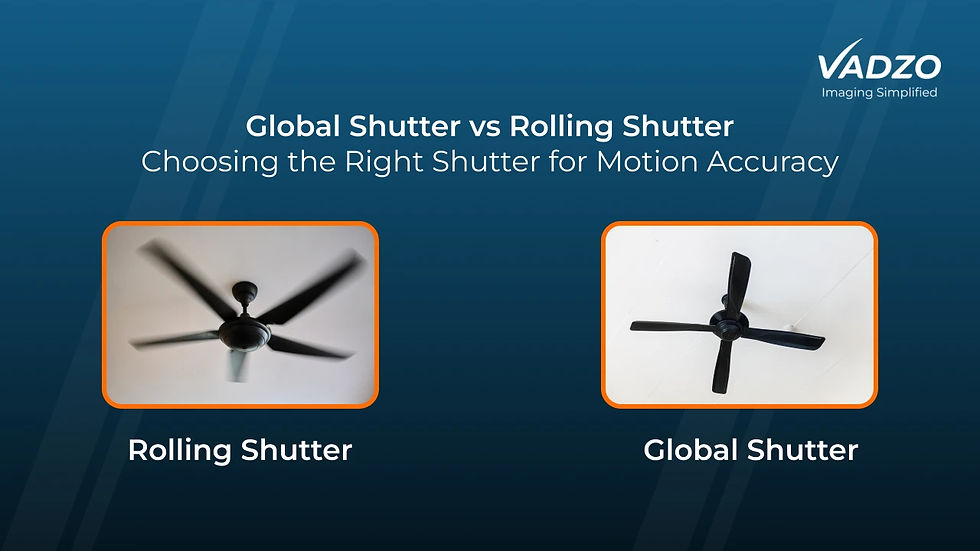
A global shutter camera for OCR exposes every pixel simultaneously. A rolling shutter sensor exposes row by row.
On a static document, that difference is invisible. On moving text, it is fatal, because a rolling shutter records the top and bottom of each character at different moments and skews the glyph into a shape the engine was never trained on.

Does OCR Need a Global Shutter Camera?
The answer to whether OCR needs a global shutter camera depends entirely on whether anything moves during exposure.
For a kiosk, an archive stand, or any station where the document is placed and held still, a rolling shutter is fine and usually cheaper. Most document capture is exactly this case.
The moment text moves past the camera, does OCR need a global shutter? The answer becomes yes. A date code reading camera on a filling line, a label inspection camera on a moving web, a logistics OCR camera reading shipping labels on a moving parcel- all of these need simultaneous exposure, or the characters distort.
Vadzo’s global shutter options span three interfaces. The Falcon-234CGA and Falcon-568MGS on USB 3.2 Gen 1, the Bolt-234MGS and Bolt-235CGS on MIPI CSI-2, and the Innova-900MGS on GigE, which is described as purpose-built for logistics OCR and high-speed industrial vision.
Barcode work pushes the same way. A barcode and OCR camera usually reads both on the same moving object, and barcode decoding is even less tolerant of skew than character recognition.
Mono Camera for OCR: Why It Often Wins
A mono camera for OCR has no colour filter array, so every pixel collects full-spectrum light, and nothing is interpolated.
That matters because demosaicing reconstructs two of every three colour values per pixel, and reconstruction softens exactly the high-contrast edges that define a character stroke. A mono camera for OCR gives you true per-pixel detail at the same nominal resolution.
Mono also gains roughly a stop of sensitivity, which helps in dim offices and lets you shorten exposure on moving text.
Choose colour only when colour carries information. A coloured security feature, a colour-coded form, or a scene you also need for human review. The Falcon-568MGS, Bolt-830MRS, Bolt-234MGS and Innova-900MGS are the mono options; everything else in the lineup is colour.
Interface and Integration: USB, MIPI CSI-2 and GigE
The interface does not change image quality. It changes how quickly you get to a working prototype and how far the camera can sit from the compute.
A USB camera for OCR is the fastest route to a running system. A UVC camera for OCR needs no driver development at all, which is why it dominates kiosk and desktop deployments. A UVC camera for OCR also works identically across Linux, Windows, and Android hosts.
A MIPI camera for OCR goes straight into an SoC. There is no protocol stack in the path, so a MIPI camera for OCR is the lower-overhead choice for a custom embedded camera for OCR board, at the cost of short cable runs.
A GigE camera for OCR solves distance. Standard Ethernet runs tens of metres with PoE, which is what a logistics OCR camera on a sorting line usually needs, since the controller is nowhere near the read point. A GigE camera for OCR also lets one host serve several read points over existing network infrastructure.
OCR Camera SDK and Getting Frames Into Your Engine
Camera choice is only useful if you can drive it from your application.
Vadzo modules are supported by the VISPA ARC SDK, with C, C++, C#, and Python APIs. That OCR camera SDK exposes the controls that matter for text capture. Exposure, region of interest, autofocus, and GPIO. Rather than just handing you a video stream.
Those specific controls map directly onto the problems in this post. ROI lets you crop to the text area so your pixels-per-character budget is spent where it counts. Exposure control lets you tune for contrast rather than for a pleasant-looking image. GPIO lets you synchronise illumination with capture.
In practice, your pipeline is short: acquire a frame through the OCR camera SDK, hand the buffer to Tesseract, PaddleOCR or EasyOCR, then validate the returned string against a checksum or format rule. The camera’s job is to make the middle step easy.
The Vadzo OCR Camera Lineup
Sixteen modules across four interfaces. Use the sections above to fix your resolution, focus, and shutter requirements first, then pick from the matching table.
USB 3.2 Gen 1: Falcon series
Camera | Sensor | MP | Color/Mono | Focus | Key Features |
Onsemi AR1335 | 13MP | Color | VCM Autofocus | ROI-based AF, Digital PTZ, iHDR | |
Onsemi AR1335 | 13MP | Color | Fixed | Fixed-distance capture | |
Onsemi AR0830 | 8MP | Color | VCM Autofocus | LI-HDR, eDR, on-chip ISP | |
Onsemi AR0821 | 8.3MP | Color | VCM Autofocus | 140dB HDR | |
Onsemi AR0821 | 8.3MP | Color | Fixed | HDR | |
Sony IMX568 | 5.1MP | Mono | Fixed | Global Shutter | |
Onsemi AR0521 | 5.1MP | Color | VCM Autofocus | Variable-distance capture | |
Onsemi AR0234 | 2.3MP | Color | VCM Autofocus | Global Shutter |
This is where most document work lands. The Falcon-1335CRA is the module to start with for a full-page document scanning camera, since 13MP with ROI-based autofocus gives you both the pixel budget and the focus control that a large field of view demands.
USB 2.0: Merlin series
Camera | Sensor | MP | Color/Mono | Focus | Key Features |
Onsemi AR0521 | 5MP | Color | Fixed | On-board storage, dual streaming | |
Onsemi AR0521 | 5.1MP | Color | Fixed | Cost-optimised capture | |
Sony IMX291 | 2.13MP | Color | Fixed | Low-light capture |
Use these where the field of view is small, and the budget is tight. A kiosk OCR camera reading ID cards or barcodes at a fixed distance does not need a 13MP sensor, and the pixels-per-character maths earlier shows why.
The MerlinPlus-521CRS is worth a separate look. On-board storage and dual streaming let a standalone kiosk buffer captures locally instead of depending on a continuous host connection.
MIPI CSI-2: Bolt series
Camera | Sensor | MP | Color/Mono | Focus | Key Features |
Onsemi AR0830 | 8MP | Mono | Rolling | HDR to 100dB, NIR 850/940nm, Wake-on-Motion | |
Onsemi AR0830 | 8MP | Color | Rolling | HDR, Wake-on-Motion, auto ISP | |
Onsemi AR0234 | 2.3MP | Mono | Global | Global Shutter, HDR | |
Onsemi AR0235 | 2.3MP | Color | Global | Global Shutter, HDR |
These are the modules for a custom board. The Bolt-830MRS combines mono, 8MP and NIR, which is the strongest single specification in the lineup for an ID card scanning camera or an MRZ passport reading camera. Wake-on-Motion also matters for battery-powered readers, since the module can idle until a document appears.
GigE: Innova series
Camera | Sensor | MP | Color/Mono | Shutter | Key Features |
Sony IMX900 | 3.2MP | Mono | Global | Quad HDR 120dB, dual NIR, PoE, ONVIF S/T/G |
Purpose-built for logistics OCR and high-speed industrial vision. Mono, global shutter, 120dB HDR, and PoE over a long cable run is exactly the combination a parcel or pallet read point needs, and it is also the right starting point for a license plate recognition camera, where the plate is moving and the lighting is uncontrolled.
Frequently Asked Questions
What is an OCR camera?
An OCR camera is a camera specified around putting enough clean pixels on each character for a recognition engine to classify it. Asking what is an OCR camera is really asking what separates it from a webcam, and the answer is resolution across the text area, sharp focus at the actual working distance, enough dynamic range to survive glare, and a shutter that does not distort moving characters. Consumer cameras fail on documents because their noise reduction and sharpening smear the fine strokes OCR depends on. There is no OCR processing inside the camera itself. The engine runs on your host, and the camera’s job is to hand it a frame worth processing. Vadzo offers sixteen modules built for this across USB 3.2 Gen 1, USB 2.0, MIPI CSI-2, and GigE.
How many megapixels do I need for OCR?
There is no single answer, because how many megapixels for OCR depends on your field of view, not the document. Divide your sensor’s vertical pixel count by the height of your field of view, multiply by the height of your smallest character, and aim for around 25 pixels per character. A full A4 page needs roughly 8.7 megapixels of well-used sensor to reach the 300 DPI baseline, while an ID card at the same DPI needs well under one megapixel. Oversizing costs frame rate, bandwidth and host compute without improving accuracy. Vadzo’s range spans 2.13MP to 13MP so you can match the sensor to the calculation rather than over-buying. The Falcon-1335CRA for full-page work, the Merlin-521CRS for a fixed-distance card reader.
Does OCR need a global shutter camera?
Only when something moves during the exposure. For a kiosk, a document stand, or any station where the page is placed and held still, rolling shutter is fine and usually cheaper. If text moves past the camera, rolling shutter records the top and bottom of each character at different instants and skews the glyph into a shape the engine was not trained on. That makes global shutter mandatory for a date code reading camera on a filling line, a label inspection camera on a moving web, or a parcel read point. Vadzo covers this on three interfaces, with the Falcon-234CGA and Falcon-568MGS on USB, the Bolt-234MGS and Bolt-235CGS on MIPI CSI-2, and the Innova-900MGS on GigE.
Is mono or colour better for OCR?
Mono is better for OCR in most cases, and it surprises people. A mono sensor has no colour filter array, so no demosaicing is needed and nothing is interpolated, which preserves the high-contrast edges that define a character stroke. Mono also gains roughly a stop of sensitivity, which helps in dim rooms and lets you shorten exposure on moving text. Choose colour only when colour carries information, such as a coloured security feature, a colour-coded form, or a frame you also need for human review. Vadzo’s mono options for OCR are the Falcon-568MGS, Bolt-830MRS, Bolt-234MGS and Innova-900MGS.
Can I use a USB webcam for OCR?
For a prototype, sometimes. For a product, no, and the reasons are specific rather than snobbery. Webcams fix the field of view and focus range around faces at conversational distance, so you cannot control your pixels-per-character budget. Their image processing is tuned to flatter skin tones, applying noise reduction and sharpening that destroy fine stroke detail. They also give you no ROI control, no reliable exposure locking, and no NIR response for MRZ work. A USB camera for OCR built for the job solves all of that while keeping the plug-and-play advantage. Vadzo’s Falcon and Merlin modules are UVC devices with the VISPA ARC SDK exposing exposure, ROI and autofocus control.