Certificate of Compliance for Embedded Cameras

A one-page PDF arrives from your camera supplier with a logo, a model number and a signature. The model matches the module on your bench, the release meeting is Thursday, and someone in the room will ask whether that page is enough to ship the machine.
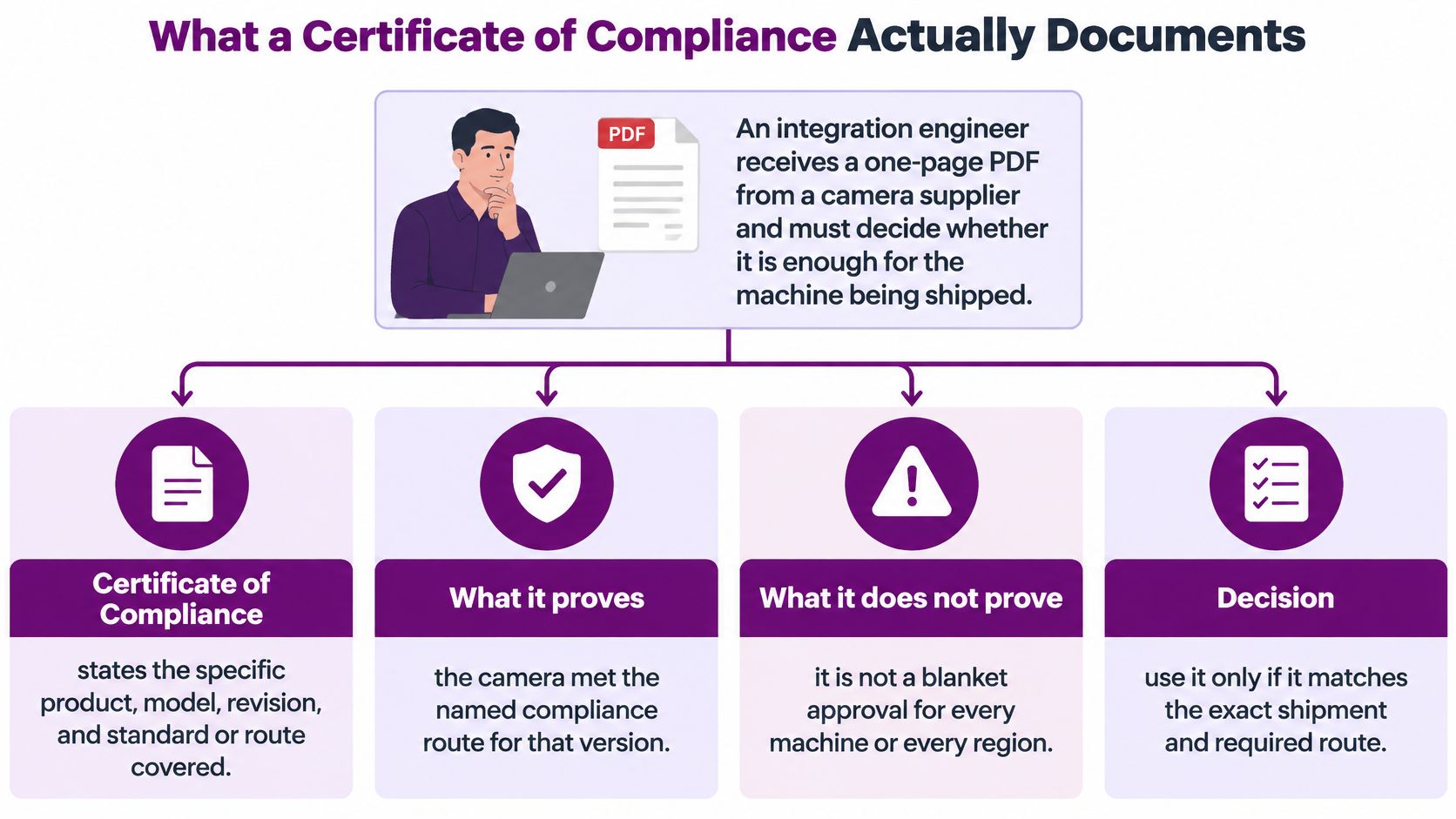
A certificate of compliance is a written statement that a named product meets defined requirements. It isn't a quality badge, a warranty, or a permission slip that covers everything the supplier sells. Its value depends on how tightly it names the thing you're buying, and on whether the requirements it cites are the ones your target market enforces.
For cameras, that distinction bites harder than for most components. A module rarely reaches the market on its own. It becomes part of an AMR, a drone, a kiosk, a parking post or a patient monitor, and the compliance question shifts from the module to the assembly built around it.
Table of Contents
What a Certificate of Compliance Actually Documents - Auditing a one-page USB camera certificate
Document Types and Integration Changes Compared - Mapping your product to the route - Changes that force a new document
Where Camera Integrators Need a Certificate of Compliance - Drones and UAVs - AMRs and AGVs - Kiosks and digital signage - Smart parking and smart farming - Medical devices and point of care
What a Certificate of Compliance Actually Documents
Five elements make a certificate traceable, and a document missing any of them is worth a follow-up email before it goes into your release file.
Product identity: the exact model, hardware revision, sensor and interface configuration. "4MP USB camera" is a category, not an identity.
Requirement: the legislation or standard the product is measured against, whether electromagnetic compatibility, radio equipment, electrical safety or restricted substances.
Responsible party: the manufacturer or authorized representative, with an address you can serve a letter to and a name that appears on shipping documents.
Evidence basis: the test standards and normative documents used, plus a pointer to the test report behind them.
Firmware and date: the firmware version assessed, the issue date and a signature.
The European Union separates two things that get blurred inside supplier packs. Manufacturers generally prepare a Declaration of Conformity after completing the conformity-assessment procedure required by the applicable harmonisation legislation, and European Commission guidance on conformity documents states plainly that certificates are not automatically obligatory and that a certificate itself must not bear the CE marking. A third-party certificate is required only where the legislation names a notified body. Treating a generic compliance certificate as universal authorization is how teams miss a requirement, because the responsible party has to identify every applicable rule rather than the one that was convenient to test.
Auditing a one-page USB camera certificate
Say the page in front of you names a 1080p USB 2.0 module, cites the relevant emissions and immunity standards, gives a manufacturer address in Asia, and stops there. Three gaps surface in under a minute. There's no radio standard because the product has no radio, which is correct for this variant and means the Wi-Fi sibling needs an entirely different document. There's no statement about the host, the cable or the enclosure, so nothing on the page covers the kiosk you're building around it. And the firmware line is missing, which matters because a later build that changes frame timing, clock behaviour or power states is not the unit that sat in the chamber.
Practical rule: if the page doesn't name the hardware revision, the interface and the firmware version, you're holding a claim rather than evidence.
When procurement starts asking which document proves which clause, a requirement-to-evidence table for procurement teams gives you the structure to map each requirement to a specific artefact instead of handing over a folder and hoping.
How to Verify and Keep a Camera Certificate Valid
Verification is a scan, not a reading exercise. Put the certificate beside the datasheet, the bill of materials and the purchase order, then work down the list. Each row answers one question, and a single failed row is enough to stop a shipment decision until the right document arrives.
What to check | Where to look | Pass condition | Fail action |
|---|---|---|---|
Named model and hardware revision | Datasheet and certificate | Exact match, including any revision suffix | Stop and request the correct document |
Interface and sensor configuration | BOM and technical sheet | The USB, GigE, MIPI or SerDes variant matches the certified build | Don't assume reuse across variants |
Standards and legislation cited | Certificate body | EMC, safety and RoHS clauses that apply to your market are present | Ask for the missing clause or a new declaration |
Radio standard present | Certificate and test report | A radio clause appears whenever the variant carries Wi-Fi, Bluetooth or a SerDes link | Read the document as covering a non-radio product only |
Responsible party location | Certificate header | A US-based responsible party for SDoC work, an EU representative for the EU market | Escalate before the first shipment |
Camera-only or host coverage | Scope paragraph | A written statement of whether a host, antenna or cable was tested | Plan a retest of the end product |
Supporting test report and technical file | Supplier document pack | The report references the same model and revision | Request the report, not just the certificate |
Firmware version assessed | Certificate or technical file | The version you ship, or a documented equivalence | Reassess after the firmware change |
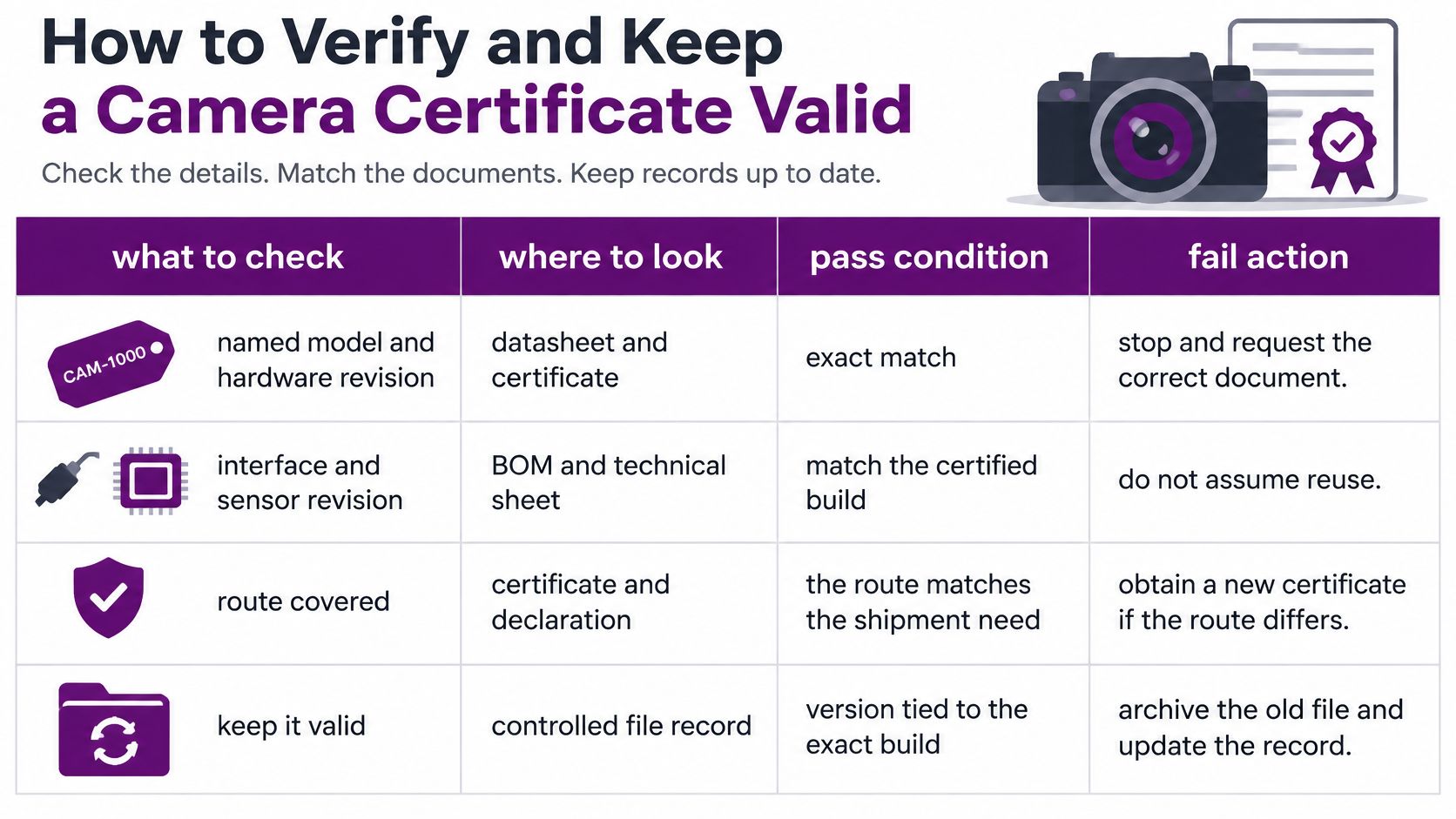
Treat the certificate like a key cut for one lock. It fits exactly one build, and the moment the build changes shape, the key stops turning. Keep the certificate, the bill of materials, the firmware version, the enclosure drawing and the manufacturing site in one controlled file. A certificate floating in a shared drive with no revision link is the document that fails an audit, because nobody can prove which build it belonged to.
Substitutions are where validity breaks:
Chipset or sensor swap. A pin-compatible part with a different clock tree produces a different emission profile, so ask for the report that names the new part.
Connector and cable change. The cable is often the radiating element, which is why the tested cable has to appear in the file.
Power supply change. A different adapter brings a different switching frequency and a different conducted emissions result.
Lens and IR filter change. New driver behaviour for an IR-cut filter or an IR LED array is new circuitry inside the housing, not a cosmetic variation.
On the supplier side, compliance statements should be published openly, and the datasheet for each model can be requested from the website. Under Designed for Compliance we list FCC certification, UL certification and CE certification, and we certify that all parts, semi-finished goods, manufacturing processes and products comply with the RoHS, RoHS 2 and RoHS 3 Directives, including the exemptions in Annex III and Annex IV. Our REACH statement confirms that our products are articles as defined in Article 3(3) of the regulation, that they emit no substances under normal conditions, and that they contain no Substance of Very High Concern and none of the restricted substances listed in Annex XVII. The Product Compliance page carries the current statements for each camera family, so the revision you order is the revision the paperwork describes.
Archive five things and a customer audit becomes an afternoon's work rather than a week of email.
The certificate or declaration, tied to model and revision.
The test report it references.
The technical construction file.
The bill of materials for the tested build.
The change-control record showing every revision since.
Document Types and Integration Changes Compared
An integration team can leave a design review with five PDFs and still not know which file the buyer will accept. Each document answers a different question, and a camera declaration covers one named build. Change the housing, the host board, the cable, or the radio, and that declaration no longer describes the product you are about to ship. Bind the route to the hardware revision, the interface configuration, and the responsible party. A vendor PDF with no revision on it does not travel with the design.
Document | Issued by | Covers | Required when | Does not cover |
|---|---|---|---|---|
Supplier certificate of compliance | Manufacturer or authorized representative | Named product or model against named standards | Supplied as evidence to the OEM or buyer, not itself a legal authorization | Host system, enclosure, cabling or substitutions |
Accredited test report | Independent test lab | Measured emissions, immunity, radio or safety results for a tested sample | Supporting evidence behind a declaration or certification | Untested configurations or production drift |
EU Declaration of Conformity | Manufacturer or authorized representative | All applicable harmonisation legislation and standards for the product | Selling into the EU under the applicable directives | The CE mark itself, which is affixed on the basis of the declaration |
FCC Supplier's Declaration of Conformity (SDoC) | Responsible party located in the United States | Unintentional radiators and eligible devices against FCC technical standards | Marketing non-wireless products such as USB-only cameras or hosts | Devices that require Certification, and it does not transfer legal responsibility |
FCC Certification | FCC-recognized Telecommunication Certification Body | Intentional radiators and devices excluded from SDoC | Products with radios, or when the responsible entity is on the Covered List | Host integration or antenna changes outside the tested setup |
A certificate for electronic equipment identifies the exact product or model, the applicable legislation, the responsible manufacturer or authorized representative, and the standards used. The EU conformity assessment framework sets that out: the manufacturer prepares the Declaration of Conformity, and a notified body is involved only where the legislation names one.
The US model splits the job differently. The responsible party, a party located in the United States, determines through testing that the device meets the technical standards, keeps the records, and stays accountable for units marketed as identical to the tested sample. SDoC replaced the older verification and Declaration of Conformity routes for eligible devices after the 2017 equipment-authorization reforms. Those older procedures remained available during a transition period until November 2, 2018, under the FCC equipment authorization procedures. Non-wireless products such as USB-only equipment still need authorization through Certification or SDoC before marketing.
Mapping your product to the route
Read the row for the product you ship, not the base model on the datasheet. The interface decides whether a radio file exists at all.
Product you ship | Routes in play | Document that proves each one |
|---|---|---|
Bare camera module sold to an OEM | EMC and RoHS; radio only if that revision has Wi-Fi or another wireless interface. A SerDes link (FPD-Link, GMSL) is a wired connection and belongs in the EMC file | Supplier certificate naming model and revision, the EMC test report, and a RoHS statement. Add a radio grant only for the wireless variant |
Camera integrated into an AMR or drone | EMC for the assembly, radio for a wireless link, RoHS | End-product EMC report, radio certification for the fitted module and antenna, updated declaration naming the responsible party |
Kiosk or smart signage terminal | EMC, electrical safety, RoHS, radio if wireless | End-product safety and EMC reports, supplier declarations for the camera revision that was fitted |
GigE camera across a parking or farm site | EMC, RoHS, and power delivery over the installed cabling | Test report covering the PoE-powered variant and its cable configuration |
Medical point-of-care device | IEC 60601-series safety and EMC on the device, plus RoHS | Device-level safety and EMC evidence, with the camera certificate as an input only |
Three edge cases catch teams on the same review. A Wi-Fi or other wireless variant needs the radio route even when the base model did not. A SerDes variant does not: FPD-Link and GMSL are wired links, so they stay in the EMC file with the cable and connector. A USB-only camera is an unintentional radiator and still needs FCC authorization through Certification or SDoC. A MIPI camera carries no radio, yet its interface clocks switch fast and still emit, so the module belongs in the EMC file for that carrier-board revision.
Before the file goes to the buyer, check four bindings on the paperwork itself.
Model and hardware revision match the build on the line.
Interface configuration matches what was tested: USB, GigE, MIPI, PoE, or a named wireless module and antenna.
The responsible party on the SDoC or declaration is the party who will market that configuration.
The standards list matches the route in the table above, not a neighbouring product family.
Changes that force a new document
A declaration works like a vehicle approval tied to one body and one powertrain. Swap the shell or the board that clocks the sensor, and the measured sample is no longer the product.
Change | Likely effect | Action |
|---|---|---|
Enclosure or housing change | Shielding and resonance shift, emissions move | Retest emissions and update the declaration for the new housing |
Cable or connector substitution | Cable-borne radiation and impedance change | Retest with the production cable and name that cable in the file |
Power supply or clocking change | New switching frequencies and harmonics | Review the EMC file, retest if the spectrum changes |
Antenna or Wi-Fi module swap | Radio performance and spurious emissions change | New radio certification for that module and antenna combination |
Lens, IR-cut filter or IR LED added | New wiring and driver circuitry inside the housing | Reassess emissions and update the technical file |
Host carrier board swap | Different stack-up, grounding and interface clocks | Re-evaluate the end product, not the module certificate alone |
Firmware change altering radio duty cycle | Transmit behaviour differs from the tested sample | Confirm with the lab whether retest is required |
Manufacturing site or subassembly source change | Production consistency, and for listed entities the route itself | Review the file and Covered List status before shipping |
Restricted-substance status follows the bill of materials rather than the emissions certificate. A new solder paste, a new conformal coating, or a process change at the assembler needs its own declaration trail. That is the same split described in Vadzo's RoHS, REACH and NDAA compliance overview for camera lines: module-level evidence covers the module. It does not cover the machine the module is built into.
Where Camera Integrators Need a Certificate of Compliance
Each market asks a slightly different question of the same document, and the answer determines which certificate you need on file. The pattern repeats across applications: the certificate names one revision and one configuration, and the moment the hardware around the camera changes, the document stops describing what you are shipping.

Drones and UAVs
A drone with a Wi-Fi downlink carries an intentional radiator, so the radio route applies to the module and antenna combination you fit, not to the module alone. The airframe also needs EMC evidence for the integrated assembly. Public sector and defense buyers frequently ask for NDAA status alongside the certificate, which is a procurement question rather than an emissions one, and it belongs in the same file. Vadzo Imaging's Bolt-234CGS MIPI camera is one example of a module carrying NDAA-compliant status, which means the airframe file can reference it directly when a buyer asks.
AMRs and AGVs
Robot guidance leans on global shutter sensors to keep moving objects sharp, and navigation sensors raise functional-safety questions that sit outside EMC entirely. ASIL certification for embedded cameras enters the conversation at that point, because the safety route and the emissions route run in parallel and produce different documents. A board-level MIPI camera can keep the module inside the enclosure with short, board-level connections, but the assembly still needs its own EMC evidence. A certificate written for a bare module on a test bench does not describe that module bolted inside a steel chassis next to motor drives, so integrators should expect the enclosure build to sit in the robot's own technical file.
Kiosks and digital signage
A USB or GigE camera inside a publicly accessed terminal inherits the terminal's electrical safety and EMC obligations. Barcode and QR reading in retail automation adds a second function to the same enclosure, and the certificate you need names the camera model, while the terminal's own file carries the safety evidence. The practical check is simple: read the certificate line by line and confirm that the interface, cable length and power arrangement printed on it match the way the camera is wired inside the kiosk.
Smart parking and smart farming
Cameras mounted across a site need reach and power over one cable. GigE supports cable runs up to 100 metres with Power over Ethernet available, which USB and MIPI do not offer, as this comparison of GigE, USB and MIPI camera links sets out. That makes the PoE-powered variant the one to certify, because the power interface is part of what was tested. Swap in a locally powered variant later and the certificate no longer matches the installation, even though the sensor and firmware are unchanged.
Medical devices and point of care
USB simplifies connection to a host computer, while MIPI suits a camera designed around an embedded processing board, a distinction drawn in this embedded camera product overview for medical imaging. IEC 60601-series safety and EMC sit on the end product, so a camera certificate is an input to the device file, never the approval itself.
The supply-chain layer sits on top of all of this. FCC rulemaking on covered equipment shows that equipment produced by an entity on the Covered List may be barred from using SDoC and must go through certification with an application and supporting data instead. A change of manufacturer, chipset source, contract assembler or ownership status can therefore change the route while the model number stays identical. The same binding logic applies on the interface side: a SerDes camera link changes the emissions and cable setup compared with a USB test, so the certificate has to name the SerDes configuration and the firmware version assessed. Before release, match three things against the document: the hardware revision, the interface configuration and the responsible party. If any one of the three differs from what is printed, the certificate is evidence about a product other than yours.
Misconceptions That Cost OEMs Time and Money
"The certificate covers the whole catalog." It names a revision and a configuration, so the 4MP and 20MP models, or the USB and MIPI variants, each need their own document.
"The CE mark is the certificate." The mark is affixed on the basis of a Declaration of Conformity, and a certificate must not carry it.
"Buying the camera transfers responsibility." It doesn't. FCC equipment authorization guidance places the duty to warrant conformity, and to produce supporting evidence on request, on the designated responsible party.
"An overseas manufacturer can sign an SDoC alone." It can't, because SDoC requires a responsible party located in the United States, which is why a US importer or subsidiary appears in the paperwork.
"The module passed, so the machine passes." A tested module doesn't make the finished AMR, kiosk or patient monitor compliant, and medical device camera regulatory clearance and CE marking sit with the device rather than the component.
If the document doesn't name the exact configuration being shipped, treat it as evidence. Approval is a decision you make after checking it.
Your Next Step Before Release
Run this before the release meeting rather than after the first customer audit. The order matters: a document gap found in your own lab costs you a week, while the same gap found by a customer's auditor costs you the shipment.
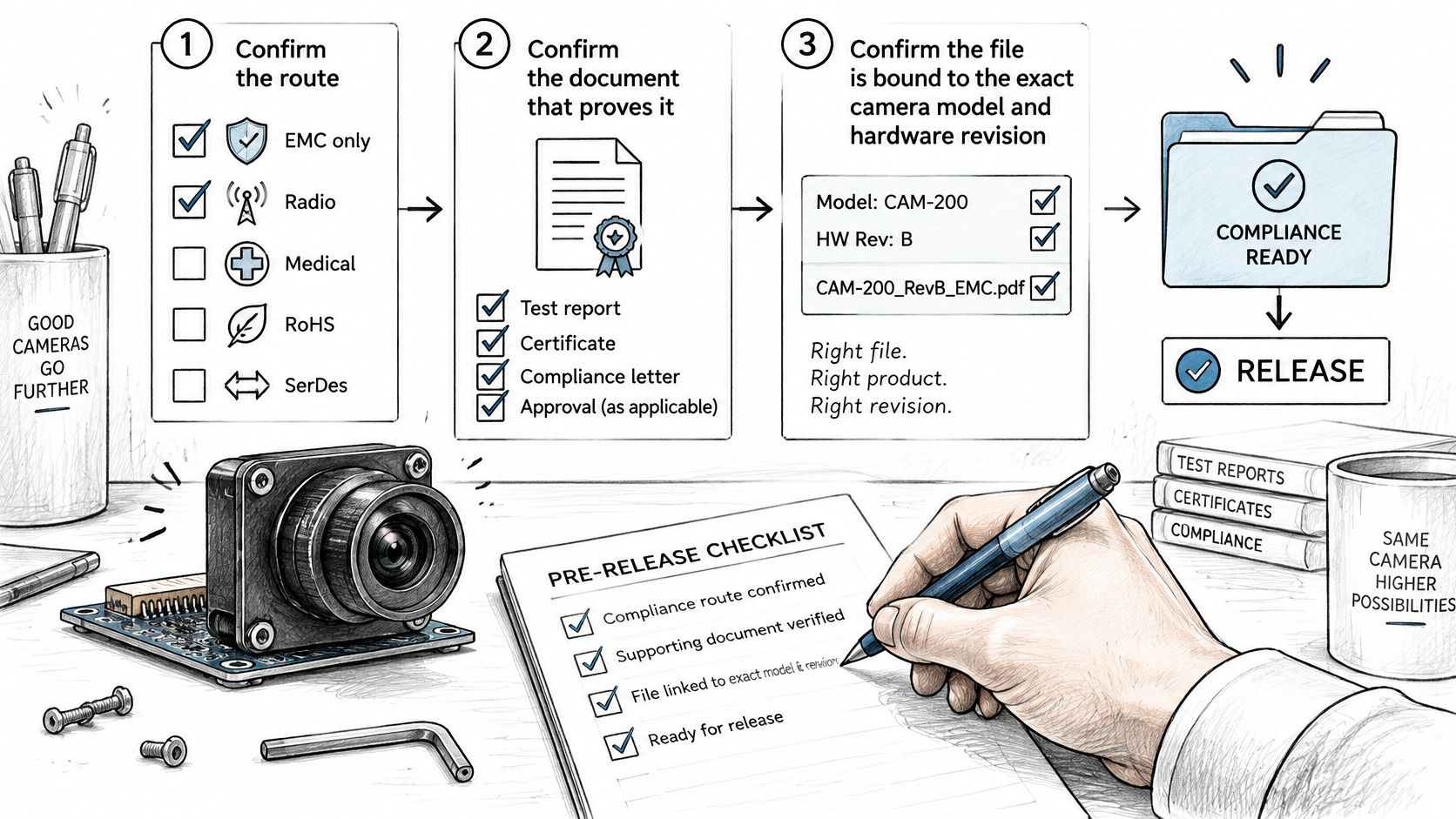
Confirm the route. EMC only, radio, medical, RoHS, or a SerDes link with its own emission profile.
Confirm the document that proves it, by name and revision, not by the folder it lives in.
Bind the file to the build, including firmware, enclosure and manufacturing site.
Assign one owner for change control, with a review at every BOM or supplier change.
Step 3 is where integration teams most often slip. A certificate stops covering your product the moment the housing or host board changes, so the binding has to name what you ship: the lens holder revision, the cable length, the enclosure material. If any of those drift during production, the document you filed at design freeze no longer describes the unit in the box.
Ask your supplier five questions in writing. Send the certificate and the test report for the exact variant. Send the technical file. Send RoHS and REACH statements current to the shipment date. Send the datasheet for the model, not the family. And answer directly whether the declaration covers the camera alone or a tested host, cable and antenna. That last question decides whether your finished machine inherits anything at all.
We supply USB 2.0, USB 3.2, ONVIF GigE, Wi-Fi, MIPI and SerDes camera families from 2MP to 20MP, including NDAA-compliant models such as the Bolt-234CGS, and the Product Compliance page plus the datasheet request channel give you the documents to check against this list. If a camera fails incoming verification, the Warranty Program and the RMA Request Form are the path to resolution.
A camera that ships with the right documents attached is a camera your customer can integrate without a compliance scramble, and that's the standard we build to at Vadzo Imaging. Our Product Compliance page carries the FCC, UL, CE, RoHS and REACH statements, and datasheets can be requested directly from the website, so your integration team can match a document to a hardware revision before the release meeting. If you need help matching the configuration you are shipping to the right documentation, our sales and technical support contacts can walk through it with you.
