Vision Automated Fulfillment: How Cameras Pick and Sort

A parcel reaches your conveyor camera, but its label faces away from the lens. The robot is ready, the order is waiting, and your team has to decide whether to retry, divert the parcel, or stop the station. Buying a sharper camera won't resolve that decision on its own.
Vision automated fulfillment connects image capture to a physical action and a recorded transaction. For an OEM team, the engineering challenge is keeping those parts aligned: optics, interface, processing time, worker safety, and maintenance after the equipment leaves the lab.
Table of Contents
Which Fulfillment Tasks Cameras Actually Handle - Specify the evidence before the sensor
How a Vision System Turns a Frame into a Decision - Give uncertainty an explicit route
Choosing USB, MIPI and GigE Cameras for Each Task - Choose optics around the actual workspace
Accuracy and Latency Numbers to Track on the Line - Separate image processing from transaction completion - Measure failures that operations must handle
Where Vision Fulfillment Runs in Real Markets - Match the design to its operating environment
Vision in Medical and Point-of-Care Equipment - Distinguish display reading from room understanding
Keeping People and Robots Safe Around Vision Systems - Separate collision protection from ergonomic risk - Make the operating policy measurable
Integration and Upkeep Over a Ten-Year Equipment Life - Build a service checklist into the design - Treat software support as part of maintainability
Which Fulfillment Tasks Cameras Actually Handle
A parcel rides a conveyor toward a picking robot. Before the arm moves, the line needs to know what the parcel is, where it sits, and whether moving it would satisfy the order. Cameras supply evidence for those decisions, but they don't all need the same view.
The core jobs are identification, picking, guidance, verification, and sorting. Treat them as separate imaging requirements, even when one camera supports several jobs.
Fulfillment tasks and the camera they require
Task | What the Camera Captures | Camera Requirement | Example |
|---|---|---|---|
Item identification | Label, barcode or product surface | Sharp focus and enough pixels on the code | Barcode reading at a fixed station |
Picking | Parcel position, orientation and surface | Global shutter or short exposure on moving items | Robot picks an item from a bin |
Robot and vehicle guidance | Floor, markers and people nearby | Wide field of view with low-light or HDR capability | AMR routing through a warehouse aisle |
Package verification | Label match and package contents | High resolution and stable lighting | Check that the label matches the order before dispatch |
Sorting | Parcel size, label and destination | Fast frame rate and synchronized capture | Parcels routed to lanes on a sorting line |
Identification needs readable detail. Picking needs position and a usable grasp surface. Guidance needs surrounding context, while verification needs an unobstructed view before the package closes; a camera can't confirm contents hidden inside an opaque carton.
The transition has been substantial: Conveyco's account of Amazon's automation history describes the March 2012 acquisition of Kiva Systems for $775 million, shelf-moving robots that reduced worker walking, approximately 200,000 warehouse robots by January 2020, and more than 1 million robots deployed across Amazon's operations network by June 2025. Modern systems combine movement with perception rather than merely delivering shelves.
Specify the evidence before the sensor
Our guide to vision-guided robotics provides context for connecting camera observations to robot movement. The essential distinction is between recognizing an object and knowing enough about it to act.
List your own tasks, match each to a table row, and record the hardest requirement. That requirement, not the highest available resolution, should lead camera selection.
How a Vision System Turns a Frame into a Decision
A cashier looks at a parcel, reads its label, checks the order, and enters the result. A vision system follows a similar sequence, except software must explicitly handle every uncertainty the cashier might resolve instinctively.
The image is only the beginning. Each stage needs a defined output and a failure path.
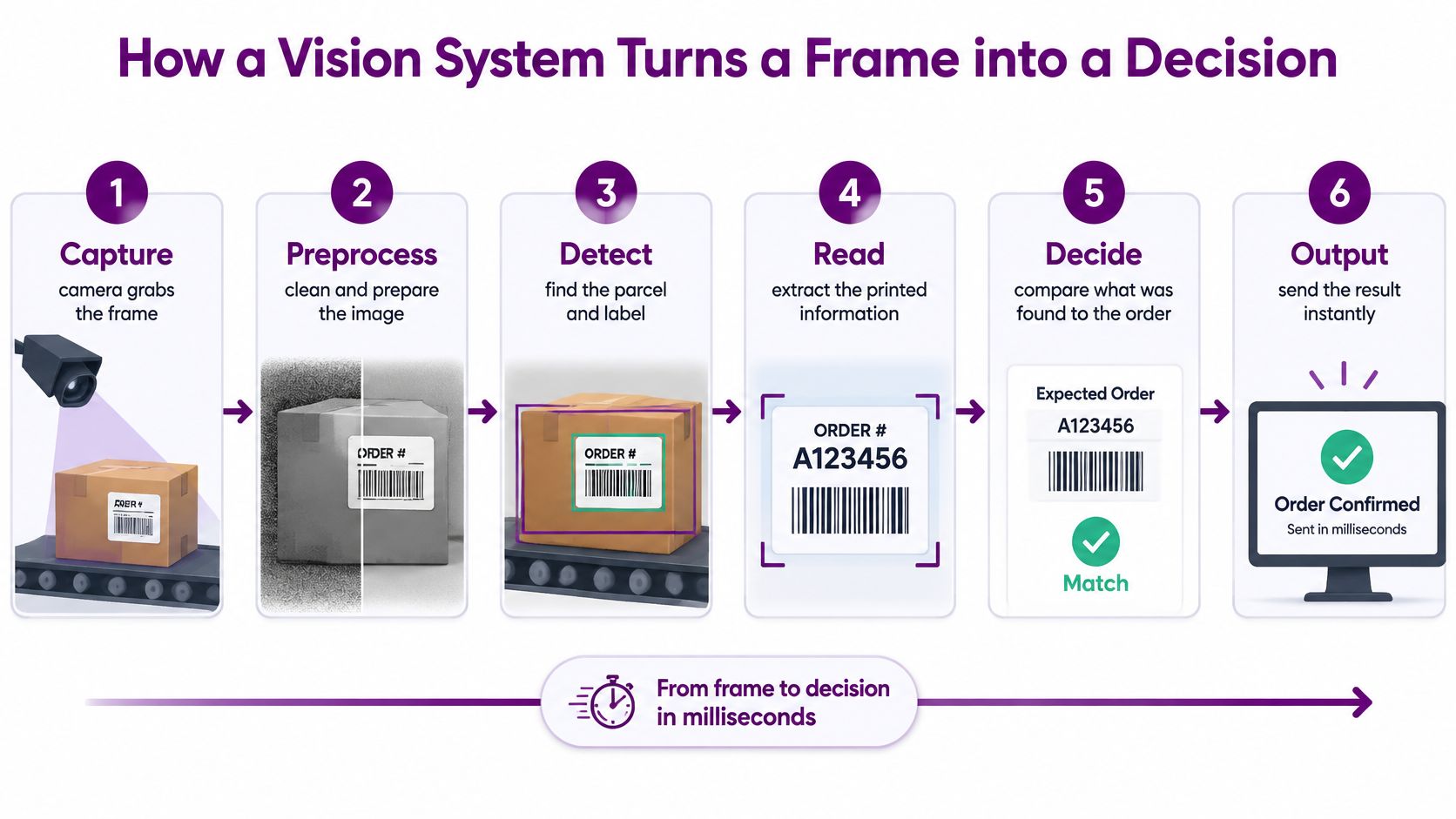
Capture. Trigger exposure when the parcel enters the usable imaging area. Keep exposure short enough to preserve moving edges. A late trigger can leave only half the package in view.
Preprocess. Prepare the image through exposure control, suitable HDR processing, and a region of interest around the relevant area. An overly tight crop can cut off the barcode's surrounding clear space or the label itself.
Detect. Locate the parcel, label, or code. Touching packages can cause the detector to merge objects that the controller must handle separately.
Read. Decode the barcode, extract printed text, or classify the product. Glare across shrink wrap can hide information even when label detection succeeds.
Decide. Compare the result with the active order and choose accept, reject, or retry. A correct read matched to a stale order record still produces a wrong decision.
Output and commit. Send the command to the robot controller or programmable logic controller, then record the inventory change. A lost acknowledgment can leave the physical parcel and software record out of agreement.
Give uncertainty an explicit route
A retry shouldn't mean repeating an identical failed exposure indefinitely. Change something useful, such as lighting, viewpoint, or parcel position, or send the item to an exception station.
Design checkpoint: A confident-looking image isn't proof of a completed transaction. Require an acknowledgment for the action and a separate confirmation for the inventory update.
Draw your pipeline before writing integration code. Mark where you'll measure time, which component owns each decision, and what happens when that component doesn't respond.
Choosing USB, MIPI and GigE Cameras for Each Task
Start with three questions: How far is the camera from the compute board? How much image data must cross the link? Does the host have a native camera port? These questions narrow the interface choice before sensor specifications become distracting.
The figures below describe interface-level choices, not guaranteed application throughput. Cable assemblies, host controllers, image format, and shared traffic still need validation.
Camera interfaces compared for fulfillment equipment
Interface | Bandwidth | Typical Reach | Best Fit |
|---|---|---|---|
USB 3.2 Gen 1 | 5 Gbps | About 3 m on passive cable | Prototypes, kiosks and single-camera stations |
USB 3.2 Gen 2x2 | 20 Gbps | About 3 m on passive cable | Robot guidance, pick-and-place and multi-camera sync |
GigE Vision | 1 Gbps per port | Camera-to-switch cable run within the selected Ethernet physical-layer specification | Fixed-mount barcode tunnels and sorting lines |
MIPI CSI-2 | Multi-lane link direct to the SoC | Short board-level link | Compact AMRs, AGVs, drones and kiosks |
SerDes (FPD-Link III, GMSL2) | Multi-Gbps over one coax or STP pair | Long cable runs from the camera to the compute board | Vehicles and robots with cameras mounted away from the compute unit |
Our industrial USB camera guide helps frame host-side integration questions. We describe our USB 3.2 Gen 2x2 cameras for robot guidance, pick-and-place, vision-based alignment, and synchronized multi-camera perception; the catalog includes the AR1335 Color 4K Autofocus USB 3.2 Gen 2x2 Camera.
Choose optics around the actual workspace
Interface bandwidth can't recover detail that the lens never resolves. Measure the picking plane, maximum package height, working distance, and smallest feature you need to distinguish before selecting the lens.
A peer-reviewed RGB-D parcel-depalletizing study used a 2,300 mm × 1,500 mm picking plane viewed from a 2,000 mm camera distance. That's a useful reference geometry, not a prescription for your station.
For moving parcels, a global shutter avoids row-by-row geometric skew; short exposure is still necessary to control motion blur. For picking, evaluate depth quality alongside the color image, especially where overlapping parcels make grasp surfaces ambiguous.
Short distance and a native SoC port point toward MIPI. A long cable run points toward GigE or a serialized link. High bandwidth into a single host points toward USB 3.2 Gen 2x2.
Validate the complete cable and host arrangement, including synchronization, rather than selecting from connector shape alone.
Accuracy and Latency Numbers to Track on the Line
A fast detector doesn't guarantee a fast transaction. A barcode-localization and decoding framework published in Scientific Reports reported 92.4% mAP@0.5 across challenging occlusion, shadow, dark, and blurred conditions, with the stage timings below; together, those timings imply approximately 86 frames per second under its reported processing conditions.
That rate isn't a promise for a conveyor installation. Exposure, image transfer, retries, and robot communication add delay outside the measured processing stages.
Reported stage times and what to timestamp
Stage | Reported Time | What to Timestamp |
|---|---|---|
Preprocessing | 0.3 ms per image | Image capture and host receipt |
Inference | 3.3 ms per image | Inference completion |
Postprocessing and decoding | 8.0 ms per image | Decode completion and retry count |
Quantity update to inventory | 1,009.09 ms average | Controller acknowledgment and inventory commit |
The same framework reported 99.7% success for real-time quantity updates, alongside the inventory-update processing time shown above. These are different measurements: detector accuracy, processing speed, and successful inventory updates answer different engineering questions.
Separate image processing from transaction completion
The timestamp column identifies useful instrumentation points, not proof that the paper measured every interval between them. In your implementation, also bracket each software stage directly so acquisition delay doesn't get mislabeled as preprocessing.
Database writes, duplicate suppression, and exception handling can dominate the transaction. Track a parcel identifier through the entire pipeline so you can distinguish a slow image from a slow inventory service.
Our explanation of video latency in embedded cameras helps distinguish camera-side delay from downstream processing. For fixed-station code reading, we offer the AR2020, a 20MP fixed-mount GigE Edge AI camera with AI-powered barcode and QR code reading.
Measure failures that operations must handle
Production acceptance should include:
Read rate by symbology and orientation. Separate difficult code layouts from easy labels.
False-read rate. A plausible wrong identifier needs different handling from an explicit no-read.
Missed-read retries. Record whether recovery requires another image or manual intervention.
p95 and p99 latency. Examine the slow tail, not just the average inference time.
Inventory-commit success. Confirm that accepted physical actions produce the intended records.
Test the worst-case parcel: damaged print, awkward orientation, reflective wrapping, and the greatest permitted working distance. A station that handles only the average parcel leaves operators responsible for the difficult cases.
Where Vision Fulfillment Runs in Real Markets
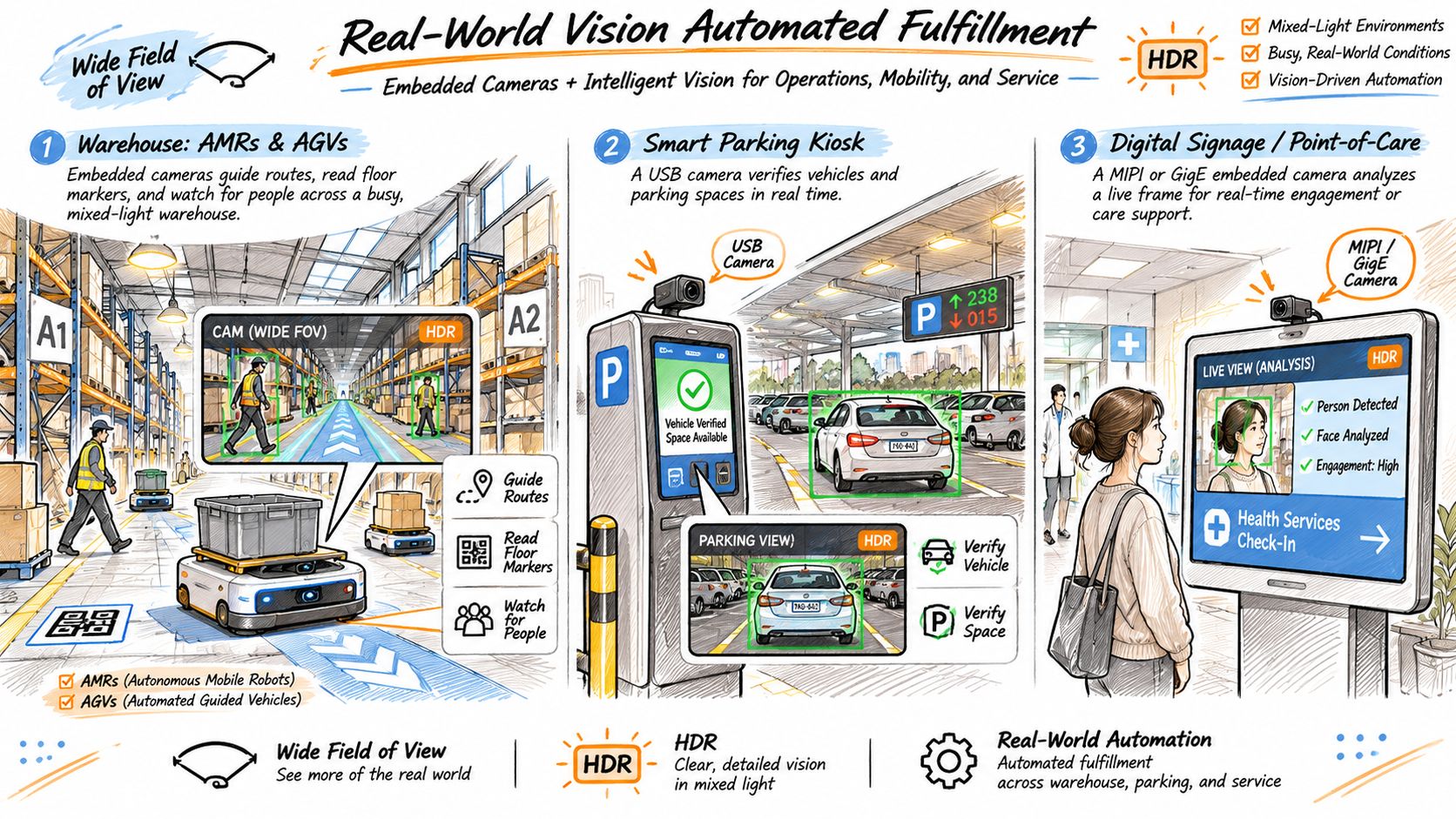
An AMR or AGV moving through a warehouse needs a useful view of its route, floor markers, and nearby people. Wide coverage and HDR help address changing illumination, but mounting must also avoid blind areas created by the vehicle's load.
At a retail kiosk, the constraint changes. Smart carts, inventory checks, checkout, and assisted product delivery need an unambiguous view of the item the customer presents, often from an unpredictable angle.
Match the design to its operating environment
Our application areas include automation and robotics, medical device and patient care, smart city, kiosk and digital signage, retail automation, security and surveillance, and telematics and fleet management. Retail applications include Smart Shelves/Smart Carts, Retail Kiosks, Inventory and Warehousing, Payment and Checkout, Self-Checkout Systems, Reverse Vending Machines, Automated/Assisted Product Delivery, and Retail Analytics.
For parcel-delivery drones and UAVs, weight and energy become central constraints. The Allied Vision drone-vision white paper explains the importance of small, lightweight, low-power hardware, vibration resistance, and low-latency processing, and describes MIPI CSI-2 acquisition into system-on-chip devices.
Smart parking needs mounting and exposure suited to headlights and outdoor lighting. Smart farming adds dust, vegetation, and changing daylight; neither application should be qualified using indoor images alone.
Station boundary. Verify that the camera decision survives the handoff to the next machine.
Network boundary. For broader distribution planning, Peak Transport's resource on optimizing freight flow between hubs gives context beyond the imaging station.
Choose the market closest to your equipment and name the constraint most likely to invalidate your design first.
Vision in Medical and Point-of-Care Equipment
A bedside-monitor camera illustrates why image preparation matters as much as recognition software. Rather than replacing the monitor, an embedded system can read its display, provided it reliably separates the screen from the surrounding room.
An ACM study of bedside-monitor vital-sign extraction used more than 4,000 images of the Mindray Beneview T8 and found that screen extraction raised mean average precision from 68.55% to 93.65% at an IoU threshold of 0.7. Its pipeline isolated the screen using contour processing, localized vital-sign values, and then applied optical character recognition.
Distinguish display reading from room understanding
For point-of-care display capture, isolate the screen before detecting its values. Validate that the crop remains correct when the monitor tilts, the display layout changes, or reflections obscure its boundary; a misplaced crop can produce a convincing but incomplete reading.
Patient monitoring requires a broader interpretation of the scene. A video-based patient-monitoring study evaluated data from 11 hospital partners, more than 300 high-risk fall patients, and over 1,000 days of inference, reporting object-detection macro F1 of 0.92, patient-role classification F1 of 0.98, and mean accuracy of 0.82 ± 0.15 for the trend of whether a patient was alone.
Its pipeline detected presence, distinguished patient and staff roles, located furniture, measured motion, and flagged boundary crossings. Those results describe separate tasks, not a single clinical-safety score.
Image-quality check. Validate fixed mounting, controlled lighting, focus, and the visibility of the required display or room area.
Information-handling check. Define access, retention, deletion, and the treatment of stored frames before a pilot.
The AR0544 Color 5MP Autofocus USB 3.2 Gen1 Camera is a catalog camera option, not evidence of medical-system validation. Which check would your device fail first: dependable capture or appropriate handling of the captured information?
Keeping People and Robots Safe Around Vision Systems
More automation doesn't necessarily reduce every category of injury. A 2025 peer-reviewed warehouse-robotics study found a 40% decrease in severe injuries but a 77% increase in non-severe injuries, with the researchers linking at least part of the increase to faster work at robotic facilities.
That distinction matters when a robot removes dangerous transport work but delivers parcels faster to the people who still lift, reach, and repack. Safer task allocation can coexist with a more demanding remaining job.
Separate collision protection from ergonomic risk
A camera can identify congestion or unsafe proximity. It doesn't, by itself, establish an acceptable repetitive lifting load, staffing level, or recovery period.
The technical review of mobile-robot safety identifies ISO 3691-4 for driverless industrial trucks, including AGVs and AMRs, ISO 12100 for machinery risk assessment, and ISO 13849-1 for safety-related control systems; it also notes that RGB-D cameras are sensitive to lighting and glare, struggle with reflective or transparent surfaces, and aren't automatically safety-rated.
Use independent safety functions, validated protective fields, speed limits, and emergency stops where the risk assessment requires them. Don't turn an ordinary object-detection output into a personnel-protection claim.
Throughput boundary: If congestion or repeated manual handling rises, reduce release rates in that zone instead of demanding faster camera-triggered work.
Make the operating policy measurable
Establish a baseline before deployment and compare equivalent operating conditions afterward:
Near misses. Record the location, task, and circumstances, not just a total.
Intervention frequency. Distinguish protective stops from operators rescuing failed automation.
False alarms. Investigate nuisance alerts before workers begin ignoring them.
Injury rates. Separate severity categories and account for exposure to the work.
Explain what cameras observe and how footage is used. Vendmoore Enterprises' camera disclosure guide for facility managers offers useful context for communicating camera use around vending installations; it doesn't replace a workplace-specific privacy review.
Define who can reduce throughput and what evidence triggers that decision. Safety performance should be demonstrated through these operating measures, not inferred from camera accuracy.
Integration and Upkeep Over a Ten-Year Equipment Life
What happens when cameras, edge processors, warehouse software, robot controllers, and lighting change over a five- to ten-year equipment life? A successful lab demonstration doesn't answer that question; the OEM needs a serviceable architecture and a repeatable way to validate changes.
The 2025 Verizon State of Smart Distribution study identifies technology complexity, fragmented AI strategies, and inadequate network foundations as obstacles to coordinating robotics, connected devices, and fulfillment systems. Integration reliability can determine whether useful recognition performance produces a useful machine.
Build a service checklist into the design
Timestamp synchronization. Maintain a shared time reference and detect clock drift before correlating events across devices.
Camera-to-robot calibration. Store calibration with equipment identity and verify it after a mount moves or a component is replaced.
Lens and focus checks. Use a reference target to detect contamination, focus drift, and mechanical movement.
Lighting variation. Recheck performance after changes to illumination, shielding, or nearby reflective surfaces.
Model version control. Record the model, preprocessing configuration, and acceptance results together. Keep a tested rollback path.
Cybersecurity. Control access, protect credentials, and define how updates are authorized.
Offline operation. Specify whether the equipment pauses, buffers transactions, or routes parcels to an exception process when connectivity fails.
Post-repair acceptance. Repeat relevant image-quality, timing, grasp, and safety checks before releasing the machine.
Treat software support as part of maintainability
Our VISPA ARC SDK supports autofocus, still capture, region of interest, image flip, SMART IO, and secure updates for Vadzo USB cameras on Windows and Android. Those controls belong in the software-maintenance assessment, alongside host compatibility and the application's configuration-management process.
Keep a recoverable configuration for every deployed station. A technician should be able to identify the installed camera, lens setting, firmware, model, and calibration without reconstructing the system from scattered notes.
A modular camera and edge-compute architecture can simplify upgrades and reduce dependence on one automation platform. Preserve clear interfaces between image acquisition, perception, machine control, and inventory services so replacing one component doesn't force an uncontrolled redesign.
Confirm Your Pilot Plan Before You Buy Cameras
Make the pilot a decision process, not a camera demonstration. Agree on acceptance criteria with controls engineering, operations, safety, and the team responsible for inventory records.
Assign the tasks. Match every intended job to the fulfillment-task table and record the requirement likely to fail first. Select representative difficult parcels and define how exceptions will be handled.
Select the connection. Use distance, bandwidth, and the host port to choose an interface, then challenge that choice against your market's operating constraint. Include mounting, optics, and cable routing in the pilot configuration.
Complete the risk review. Conduct a formal machinery risk assessment and review applicable mobile-equipment and safety-control requirements before purchasing cameras. Define evidence for both normal operation and foreseeable faults.
Our support team provides technical consultation for camera selection and help getting cameras working with your system. We also offer a Camera Selector, FOV Calculator, and Product Compliance page, with customization and bulk-quantity quotations available on request.
For the first measurable test, time a complete transaction from image capture to inventory commit. Compare the result with your latency budget and inspect every interval that exceeds its allocation.
Vadzo Imaging offers OEM camera products, custom imaging solutions, and technical consultation for embedded vision integration. Visit Vadzo Imaging with your working distance, smallest readable feature, host interface, and transaction-time target to discuss a camera configuration for your fulfillment pilot.
