Vadzo Varsity Technical Resource
How is RAW Bayer data converted to RGB888?

A digital camera sensor does not directly produce a full-color image. Instead, it produces what is called RAW Bayer data. This data contains only partial color information. To display or process the image, it must be converted into a standard format such as RGB888, where each pixel contains full red, green, and blue values.
RGB888 means that every pixel has 8 bits for Red, 8 bits for Green, and 8 bits for Blue, making a total of 24 bits per pixel. This format is widely used in displays, computer vision systems, and video processing pipelines.
The process of converting RAW Bayer data into RGB888 involves multiple image processing stages. These stages are usually performed inside an Image Signal Processor (ISP), GPU pipeline, or dedicated image processing hardware.
Understanding RAW Bayer Data
A camera sensor is covered by a color filter array called the Bayer filter. The most common arrangement is called the RGGB pattern. In this pattern, each group of four pixels contains two green pixels, one red pixel, and one blue pixel.
The reason for having more green pixels is that the human eye is more sensitive to green light. This improves image detail and brightness accuracy.
However, each pixel in the sensor captures only one color value. For example, a red pixel only measures red intensity, not green or blue. This means that RAW Bayer data does not contain full color information for any single pixel.
Because of this limitation, we need a process called demosaicing to reconstruct the missing color values.
What is RGB888?
RGB888 is a standard color format used for displaying images. In this format, each pixel contains three values:
Red (8 bits)
Green (8 bits)
Blue (8 bits)
Each value ranges from 0 to 255. When combined, these three values create the final color of that pixel.
Unlike RAW Bayer data, RGB888 contains complete color information for every pixel. This makes it suitable for displays, video encoders, and computer vision algorithms.
Why Conversion is Necessary
RAW Bayer data cannot be displayed directly on a monitor because it does not contain full RGB information. It only contains one color component per pixel. Therefore, conversion is necessary to reconstruct the missing color components and generate a complete image.
Without conversion, the image would appear distorted and contain incorrect colors. The conversion process ensures that every pixel has proper red, green, and blue values.
Step-by-Step Conversion Process

Black Level Correction
The first step in the pipeline is black level correction. Camera sensors introduce a small offset value even when no light is present. This offset must be removed to ensure accurate brightness levels. The system subtracts a predefined black level value from every pixel. This step improves contrast and ensures that dark areas appear truly black.
Defective Pixel Correction
Some pixels in a sensor may be damaged or behave abnormally. These are called defective pixels. They may always appear bright or dark regardless of the actual scene. In this stage, the system detects such abnormal pixels and replaces their values using neighboring pixel information. This improves image quality.
Demosaicing
Dem When a camera captures an image using a sensor like Sony IMX sensors or Onsemi AR sensors, the sensor does not directly capture full RGB color information at every pixel. Instead, it uses a Bayer filter pattern. This pattern places tiny Red, Green, and Blue filters over individual pixels. Because of this arrangement, each pixel records only one color value, not all three.
The most common Bayer pattern is RGGB. In a 2×2 block, it is arranged as:
Row 1: Red, Green
Row 2: Green, Blue
There are two green pixels in each block because the human eye is more sensitive to green light. Increasing green sampling improves brightness detail and overall image quality.
To understand the conversion process, consider a small 3×3 RAW Bayer data example (RGGB pattern):
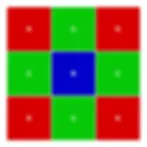
Each letter represents a pixel that stores only one intensity value of that specific color.
For example: A Red pixel may store R = 120A Green pixel may store G = 90A Blue pixel may store B = 60
However, to display a proper color image, every pixel must contain three values: (R, G, B). Therefore, the missing two color components at each pixel must be estimated. This estimation process is called demosaicing.
Consider a Red pixel with value R = 120. This pixel does not contain Green or Blue values, so they must be calculated from neighboring pixels.
First, to estimate the Green value at this Red pixel, we examine the surrounding Green pixels (above, below, left, and right).
Example nearby Green values: 100, 95, 105, 98
Using bilinear interpolation, we calculate the average:
Green = (100 + 95 + 105 + 98) / 4Green ≈ 100
Now the pixel becomes:(R, G, B) = (120, 100, ?)
Next, to estimate the Blue value, we check the diagonal neighboring Blue pixels.
Example nearby Blue values: 60, 65, 58, 62
Blue = (60 + 65 + 58 + 62) / 4Blue ≈ 61
Now the full RGB value for this pixel becomes:(R, G, B) = (120, 100, 61)
This same estimation process is repeated for every pixel in the image until a complete RGB image is formed.
The common interpolation methods used in demosaicing include:
Nearest Neighbor – Copies the value from the closest pixel of the required color. It is very fast but produces lower image quality.
Bilinear Interpolation – Uses the average of nearby pixels. It is simple and widely used in basic systems.
Bicubic Interpolation – Uses a larger group of surrounding pixels to produce smoother and sharper results.
Edge-Directed Interpolation – Detects edges and performs interpolation along the edge direction to preserve sharpness and reduce artifacts.
Adaptive Homogeneity-Directed (AHD) – Selects the best interpolation direction based on local image patterns to reduce color errors.
Machine Learning-Based Methods – Uses trained models to predict missing color values with high accuracy and better noise handling.
Demosaicing is a critical step in the image processing pipeline because it directly affects image sharpness, color accuracy, and overall visual quality. The performance of the interpolation method determines how natural and detailed the final RGB image appears.
White Balance
Different lighting conditions affect colors differently. Indoor lighting may appear yellow, while outdoor daylight may appear bluish. White balance adjusts the red, green, and blue channels so that white objects appear truly white.
This is done by applying gain factors to each color channel. For example, if the image is too blue, the blue channel gain is reduced. This step ensures natural color reproduction.
Color Correction Matrix
Even after white balance, sensor colors may not perfectly match real-world colors. A color correction matrix (CCM) is applied to adjust the relationship between red, green, and blue channels. This is a mathematical transformation that improves overall color accuracy.
The matrix modifies each output color value using a combination of the original RGB values. This step ensures that skin tones, sky color, and other natural colors look realistic.
Gamma Correction
The human eye does not respond linearly to brightness. To match human perception, gamma correction is applied. This step adjusts brightness levels using a nonlinear transformation. It enhances details in shadows and mid-tones while maintaining highlights.
Without gamma correction, images would appear too dark or unnatural.
RGB888 Formatting
After all corrections are complete, the pixel values are formatted into RGB888. Each pixel now has 8 bits for red, green, and blue. The data is arranged in memory as:
Red byte → Green byte → Blue byte
At this stage, the image is ready for display or further processing.
Complete System Architecture Explanation
In a typical embedded vision system, such as those using CMOS cameras with Jetson platforms, the processing flow begins at the image sensor. The CMOS sensor captures light and outputs RAW Bayer data.
This RAW data travels through an interface such as MIPI CSI to the Image Signal Processor. Inside the ISP, the previously discussed steps black level correction, defect correction, demosaicing, white balance, color correction, and gamma correction are performed sequentially.
After processing, the ISP outputs RGB888 or sometimes other formats like YUV. The formatted data is stored in memory and then sent to a display, encoder, or AI processing engine.
This architecture ensures real-time processing for applications like surveillance, automotive cameras, and machine vision.
Memory and Bandwidth Considerations
RAW Bayer images typically use 10-bit or 12-bit depth per pixel. RGB888 uses 24 bits per pixel. Therefore, after conversion, memory usage increases significantly.
For example, in a 1920 × 1080 image:
RAW Bayer (10-bit) requires much less memory compared to RGB888. After conversion, bandwidth requirements increase because each pixel now contains three full color values.
This is an important consideration in embedded systems where memory and processing speed are limited.
Practical Implementation
In software environments such as OpenCV, conversion from RAW Bayer to RGB can be done using built-in functions. In embedded hardware like Jetson systems, the ISP performs this conversion automatically.
In high-performance applications, hardware acceleration is used to ensure that conversion happens in real time without dropping frames.
Conclusion
The conversion from RAW Bayer to RGB888 is a multi-stage image processing pipeline that reconstructs full color information from partial sensor data. The key stage is demosaicing, which estimates missing color components. Additional corrections such as white balance, color correction, and gamma correction improve image accuracy and quality.
This entire process transforms sensor data into a display-ready RGB image suitable for computer vision, streaming, and recording applications.
Related Articles

What is a Bayer Filter?
2nd March 2026
What is a Bayer Filter?
2nd March 2026
What is a Bayer Filter?
2nd March 2026
Contact Us Today!